My home lab runs a small private AI stack. Ollama serves local language models, Open WebUI gives them a ChatGPT-style interface, and ComfyUI generates images. Everything runs on a single RTX 3060 inside a virtual machine on an old Dell server.
I had one complaint: "response time is terribly slow." Two days later:
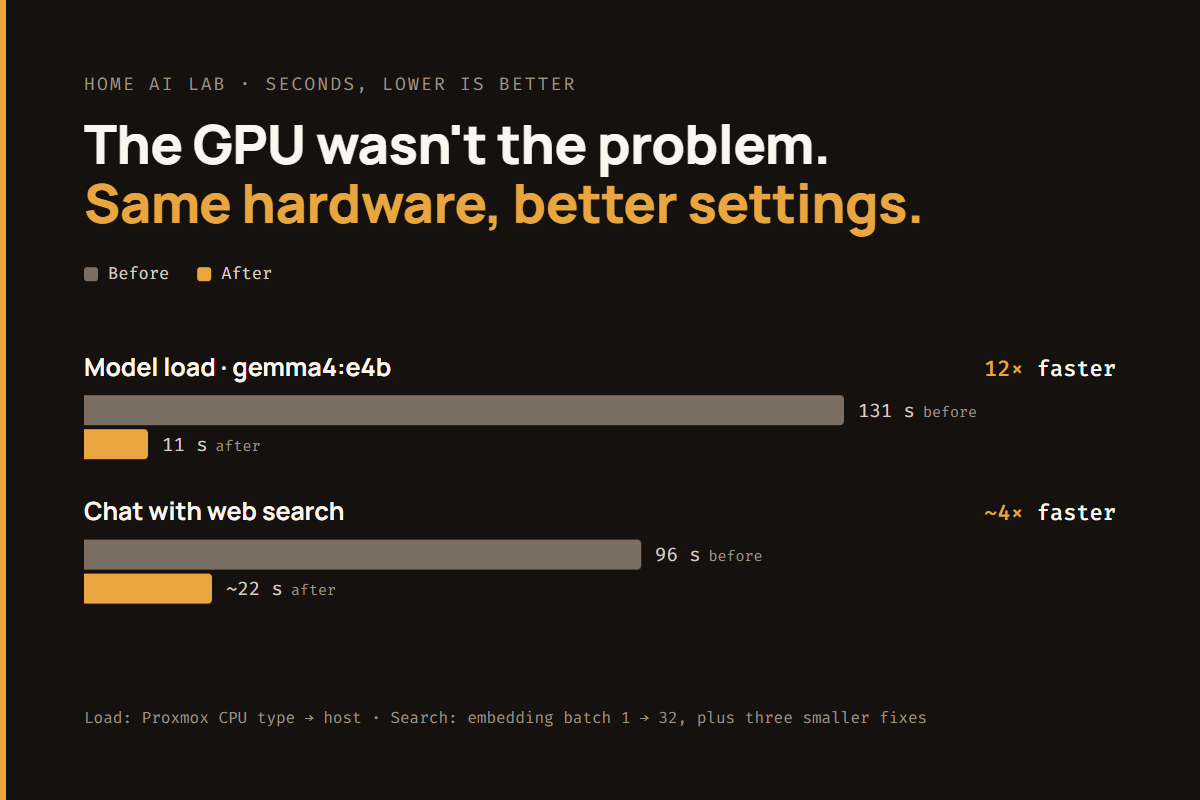
- model loads were 12× faster;
- web-search chats were 4× faster;
- none of the fixes was where I'd have looked.
I also didn't write any of the code. I worked as the product manager, and an AI coding agent (Claude Code) was the engineer. That way of working gets as much attention here as the technical fixes, because I think it's where most of us are heading.
The setup
| Layer | What it is |
|---|---|
| Hardware | Dell PowerEdge R730 with an MSI GeForce RTX 3060 12 GB |
| Hypervisor | Proxmox VE, with the GPU passed through to one VM |
| VM | Ubuntu 24.04 with 12 vCPUs and 64 GB RAM, running Docker managed by Portainer |
| AI services | Ollama + Open WebUI (chat), ComfyUI (images) |
If you came to this from my old virtualization writing at vmtoday.com, most of the stack will look familiar. A hypervisor, a VM and some containers. The new parts are the AI services and who did the engineering.
Working as the PM to an AI engineer
Before the fixes, here's how we worked, because it shaped everything else.
I described problems, not solutions. I didn't say "check the CPU flags" or "raise the batch size." I said "chat is slow," the same way I'd file a ticket for an engineering team. Working out what's actually wrong is the engineer's job. If I had prescribed a fix, I would have prescribed the wrong one: like most people, I assumed the GPU was the problem.
Guardrails are written down, not implied. The project has an instruction file the agent reads at the start of every session. It's plain English, and it says things like:
- Default to read-only review. Describe each change and get a yes before applying it.
- Snapshot or back up a VM before changing its config or OS.
- Record every notable change in the changelog.
- Never print or commit secret values.
It also records decisions I've already made, such as "the home LAN is trusted, so don't propose extra firewalls for it," so the agent doesn't re-argue them every session.
Least privilege, granted case by case. The agent's account on the hypervisor is a read-only API token. When a change needed more access, it asked, and I decided. "Manage my lab" is not blanket approval for any specific change, and the instruction file says so in those words.
This is a different skill from prompting a chatbot. It's closer to managing a capable new team member: be clear about the outcome, be explicit about the boundaries, and review the work.
Finding 1: The virtual CPU was hiding AVX2
The first thing the agent checked wasn't the GPU. It looked at which instruction sets the VM could see.
Proxmox's default CPU type for a new VM is a generic model, x86-64-v2-AES. It exists for compatibility: a VM on a generic CPU can live-migrate between hosts with different processors. The cost is that the guest can't see newer instruction sets: AVX, AVX2 and FMA.
llama.cpp, the inference engine inside Ollama, uses those instructions for model loading, for repacking weights, and for any layers that run on the CPU instead of the GPU. Without them it falls back to old SSE-only code paths.
My server is a single Proxmox host with nothing to migrate between, so I was paying that cost for nothing.
The fix: change the VM's CPU type to host, which passes the real processor's features through. Here is how that change was handled:
- The agent explained the change, why it was needed, and that it required a full VM stop and start (a reboot isn't enough). It asked for approval.
- After I said yes, it took a Proxmox snapshot of the VM.
- It stopped and started the VM, then checked that all 43 containers came back, the GPU still worked, and AVX2/FMA were now visible inside the guest.
| Measure | Before | After |
|---|---|---|
| gemma4:e4b model load | 131 s | 11 s |
| nemotron-3-nano generation (partly on CPU) | 5.4 tok/s | 17–20 tok/s |
Takeaway: if a local LLM is slow in a VM, run grep -o 'avx2' /proc/cpuinfo | head -1 inside the guest before you blame the GPU. If it prints nothing, check your CPU type.
Finding 2: Tuning Ollama and picking a default model
With the CPU fixed, the agent tuned Ollama's settings. Each one was proposed with a reason:
OLLAMA_KEEP_ALIVE=30mkeeps the model in VRAM between messages, so a new chat doesn't reload it from disk. The trade-off: it holds about 9 of my 12 GB of VRAM for half an hour. That matters for image generation, which I deal with in ComfyUI for an Automatic1111 User.OLLAMA_CONTEXT_LENGTH=16384gives a usable context window without running out of VRAM.- The image is pinned to a specific version rather than
:latest, so an update happens when I decide, not when a container restarts.
Then the benchmarks. The agent ran every model I had at warm load, mostly on the GPU:
| Model | Generation speed |
|---|---|
| gemma4:e4b | 66 tok/s |
| qwen3:8b | 52 tok/s |
| gemma4:12b | 45–53 tok/s |
| qwen3:14b | 32 tok/s |
| gpt-oss:20b (90% on GPU) | 26 tok/s |
| qwen3.6:35b-a3b (44% on GPU) | 18 tok/s |
The pattern is the one everyone with a 12 GB card learns: speed falls off sharply once a model no longer fits in VRAM. Any layers that spill into system RAM slow down the whole model.
The agent laid out the options. I chose gemma4:12b as the default: the best quality that still fits entirely on the card. That's how the work was split throughout. The agent produced the data and a recommendation, and the choice was mine.
We also deleted nine models I wasn't using, which freed 28% of the data disk. Before deleting the two coding models, the agent asked whether anything else depended on them. I confirmed nothing did. This is a small thing, but an engineer who checks before deleting is worth more than one who's fast.
Finding 3: Web search was a pipeline problem, not a model problem
The slowest thing I did regularly was ask a question with web search turned on. 96 seconds.
Instead of guessing, the agent timed each stage:
- about 20 s fetching web pages;
- about 30 s turning 662 chunks of page text into embeddings, the vectors used to find the relevant passages. These ran on the CPU, one chunk at a time;
- the rest on a "thinking mode" answer, where the model writes out its reasoning before answering. I didn't need that for everyday questions.
The model itself was the smallest part of the problem.
The fixes, in order of impact:
- Embedding batch size raised from 1 to 32. This was the main fix. Embedding one chunk per call means the hardware spends most of its time on per-call overhead.
- Thinking mode off by default on everyday models. It can still be turned on per chat. This was my call, after the agent showed what it was costing.
- Embeddings moved to the GPU. Open WebUI now uses
nomic-embed-textthrough Ollama.OLLAMA_MAX_LOADED_MODELS=2keeps this small embedding model (about 0.3 GB) loaded next to the chat model. - GPU kernel cache on persistent storage. CUDA compiles GPU kernels the first time they're needed and caches them. The cache lived inside the container, so every container update threw it away. gemma4:12b's first load after an update then took 93–99 seconds instead of about 10. The cache now lives on the persistent volume.
Result: a web-search chat went from 96 s to about 22 s.
One detail I appreciated: the agent's notes say the cache fix in item 4 is "not yet verified across a recreate." We'll only know it works the next time Ollama is updated. That honesty about what was proven and what wasn't mattered a lot more when we tested a trending GPU firmware unlock.
What made this work
Looking back, the technical fixes were small, and each one was a single setting. The hard part was knowing which setting, and two habits found them:
- Measure before you change anything. Every fix came from timing a real stage of a real request. Without that breakdown, I'd have bought a bigger GPU and seen no improvement in web-search chats.
- Keep the decisions with the person accountable for them. The agent did the research, the changes, the checks and the paperwork. I chose the default model, the thinking-mode policy and what to delete. When something breaks, I'll know why it was set up that way, because I made the call and the changelog says so.
At my day job I'm the Claude Champion for Marketing at BlueCat. I see the same pattern at work as in my lab: the value isn't in having an AI do tasks. It comes from being able to direct, verify and govern an AI that does them. I've also open-sourced a few of the Claude Code skills I use for that kind of work. One of them, huh, exists because a non-engineer directing an engineer sometimes needs to say, "Stop. Explain that in plain English."
Related: In The Trending RTX 3060 GPU Unlock, Tested Properly, a "trending GPU hack" arrived with a confident AI-written setup guide. We reviewed it against the project's source and issue tracker, tested it with a baseline and a control, and found image generation 33–58% faster with pixel-identical output. Along the way we found a wrong assumption in our own rollback plan.
More from my home AI lab: The Trending RTX 3060 GPU Unlock, Tested Properly · ComfyUI for an Automatic1111 User

Leave a Reply