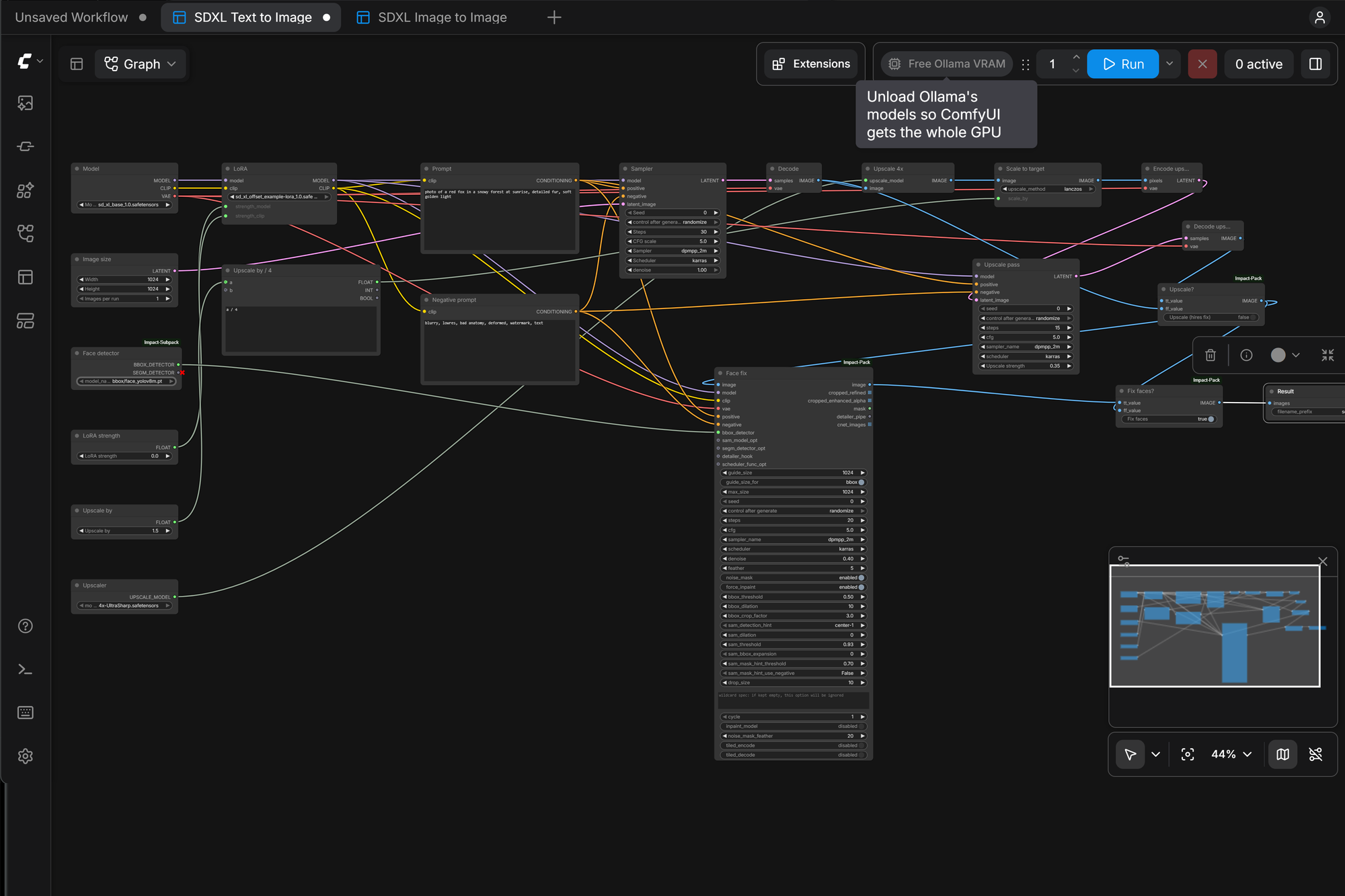
I used Automatic1111 for image generation a few years ago. One page held a prompt box, a model dropdown, a few sliders and a Generate button. Hires fix and ADetailer were checkboxes.
ComfyUI is where the image-generation community has moved since then. It's more powerful and supports newer models, but it opens to a canvas of connected nodes. My honest reaction went to my AI engineer, an AI coding agent (Claude Code) that I direct the way a product manager directs a team. I explain that working model in My Local AI Was Slow, and the GPU Wasn't the Problem. Here's what I told it:
"I had used Automatic1111 for image generation in the past. Comfy seems confusing. What extensions would you recommend to simplify use?"
That's a product problem, not a technical one, and I hadn't asked for a specific feature. The rest of this post is how the agent turned that complaint into something I actually use. It also covers the infrastructure work underneath it that you'd never see from the app.
First, the foundation
The ComfyUI install was about a year old (0.3.75). It ran as a hand-made container outside Portainer, which manages everything else on the server. Generated images were stored only inside the container. Recreating the container would have deleted every image I'd made.
The agent rebuilt it:
- ComfyUI 0.42.1 on Python 3.13 and PyTorch 2.14 with CUDA 13, built locally from a Dockerfile in my repository.
- Moved into Portainer as a stack, like every other service.
- Images, inputs, models and settings on host folders, so they survive container rebuilds.
- ComfyUI-Manager enabled, for installing models and add-ons.
- The old version kept as a stopped rollback container, until I said to remove it.
Rebuilding was easy. Getting the details right is what makes a rebuild like this hold up. The agent found that Portainer saved stack changes but didn't actually recreate the container, so it worked around that and documented it. It pinned PyTorch so that installing add-ons couldn't quietly replace it with a different build. And it wrote down the upgrade and rollback steps before I needed them.
Agreeing on the product before building it
The agent recommended a short list of add-ons, and pointed out that a recent ComfyUI release had added something more useful than any of them: App Mode. It turns a node workflow into a simple form: labeled fields, a Run button and a results panel, with the node graph out of sight.
So the plan became: rebuild what I liked about Automatic1111 as ComfyUI apps. We added the Impact Pack add-on for its face fixer, and the agent built the first app.
I also asked the agent to evaluate a new add-on I'd come across on GitHub. After its review, I decided to skip it. Knowing what not to build is part of a PM's job, and an agent that can quickly assess whether something fits your environment makes those calls cheaper.
The three apps
SDXL Text to Image is my A1111 replacement:
- Fields for the prompt, negative prompt, model, size, steps, CFG and sampler.
- A LoRA picker with a strength slider. At strength 0, the LoRA is skipped entirely.
- Fix faces: the same face-detection model A1111's ADetailer uses, run through Impact Pack's FaceDetailer.
- Upscale: A1111's hires fix. The image is enlarged with an upscaling model, then refined with a second, lighter sampling pass.
One technical detail matters here. Both toggles use lazy branches: when a toggle is off, those nodes don't run at all. With the toggles off, the app takes exactly as long as a plain generation.
SDXL Image to Image covers A1111's img2img and inpaint tabs:
- Upload a photo, set a strength, describe the result.
- For inpainting, paint a mask in ComfyUI's built-in mask editor and switch on "Inpaint masked area."
- The agent tested that nothing outside the mask changes. The mean pixel difference outside the mask was 0.00. The result is pasted back onto the original image, so the untouched areas are the original pixels.
Z-Image Turbo wraps a newer 6-billion-parameter model that makes good images in 8 steps. It has no negative prompt, because at its settings a negative prompt is ignored. The app's graph handles that, so I don't have to think about it.
Timings after a GPU firmware unlock that we tested carefully: about 16 s for a plain SDXL image, 27 s with face fix, 44 s with upscale, and about 13 s for Z-Image Turbo.
The bug I'd never have found
Z-Image Turbo failed on its first run with "Failed to find C compiler." An image generator asking for a C compiler doesn't make much sense at first.
The agent traced it. The new PyTorch version runs some ordinary operations (here, the text encoder's matrix multiply) through Triton, a GPU compiler that builds a small C helper the first time it's used. The slim container image had no C compiler, because nothing had needed one before.
The fix was two packages added to the Dockerfile and a rebuild. Then, as with every change, the agent tested the real workflow: a 1024×1024 image in about 21 seconds, warm.
This is the kind of problem where working with an agent shines. It isn't hard once you understand it. It's just obscure, it sits three layers down, and it would have cost me an evening of searching.
Sharing one GPU between chat and images
When tuning my chat setup, we set Ollama to keep its chat model in VRAM for 30 minutes. That's about 9 of my 12 GB, which leaves too little for SDXL.
The obvious fix would be a shorter keep-alive. I didn't want slower chats, though, and I said so. So the agent built a "Free Ollama VRAM" button into ComfyUI's toolbar. It's a small custom add-on that:
- asks Ollama which models are loaded;
- tells each one to unload (
keep_alive: 0); - waits until they're gone, and reports how much VRAM was freed.
It also has a bookmarkable URL. The next chat simply reloads its model.
During testing, the agent noticed the "freed" figure didn't match the actual memory, because Ollama's own estimate of its VRAM use was wrong. The button now reads the real free memory from CUDA before and after. It's a small fix, but it's the difference between a feature that seems to work and one that tells you the truth.
Models: getting and updating them safely
ComfyUI's model folders were the next friction point, so the agent made adding models a single command. I added a read-only API key for Civitai, the main model-sharing site. Now one command takes a Civitai link, then:
- works out the right folder from the model type;
- refuses anything that isn't a
.safetensorsfile; - warns if the model isn't compatible with my apps;
- downloads it on the server and verifies the SHA-256 checksum against Civitai's.
A second command checks for updates by file hash, so renamed files still match. Its first run found newer versions of five of my checkpoints. I said "replace all 5." Each was downloaded, verified and test-generated before the old file was deleted.
Asking the agent to review its own work
After the agent wrote the download tooling, we ran a security review of the changes. It found real problems in the agent's own code:
- Command injection and path traversal in the download script. A malicious file name from the website could have been interpreted as a shell command or written outside the models folder. Fixed: every value is validated and passed as a plain argument, and the file name has to match a strict pattern.
- Dependency confusion in the container build. A package index setting could have let a lookalike package from the public index replace PyTorch. Fixed with pinned constraints.
- The ComfyUI web address is restricted to my home network. ComfyUI has no login, and its add-on manager can install code.
The API key never appears on a command line or in a log. It's passed over an encrypted SSH channel only when a download runs.
The lesson: an AI agent writing code doesn't remove the need for review. It makes review cheaper. Review is easy to skip when your engineer is fast and confident. For anything that touches the internet or credentials, ask for it every time.
What I took from this
- Bring problems to your agent, not solutions. "Comfy seems confusing" led to App Mode, three apps and a GPU-sharing button. A request for "the top five extensions" would have got me a list.
- Make the decisions yourself. The keep-alive policy, which add-on to skip, and replacing the five models were my calls. The agent laid out the options and their cost.
- The infrastructure is part of the product. Persistent storage, pinned versions, rollback containers and documented upgrades are why the apps will still work in six months.
- Review AI-written code like any other code, especially where it touches the internet or credentials.
This work started with "chat is slow" and ended with a GPU tested at 33–58% faster, a private chat assistant that answers web questions in about 22 s, and image generation I actually enjoy using. I wrote no code. My job was what a PM does on any team: describe the problems, set the boundaries, make the decisions and check the work.
That's the skill I expect to matter more each year, and it's what I work on as the Claude Champion for Marketing at BlueCat. If you're building the same skill, my open-source Claude Code skills are a good place to start. I use ideate to brainstorm and prioritize what to build next, and huh for the moment every non-engineer knows: "Stop. Explain that in plain English."
More from my home AI lab: My Local AI Was Slow, and the GPU Wasn't the Problem · The Trending RTX 3060 GPU Unlock, Tested Properly

Leave a Reply