A trending "hack" for NVIDIA RTX 30-series cards came across my feed. It promised a large speed-up for AI work from an open-source kernel module. I asked Google how to set it up in my stack (Proxmox host → Ubuntu VM → Docker containers, the same lab where my local AI chat was slow for reasons that had nothing to do with the GPU) and got back a confident, well-formatted, three-step guide.
I didn't run it. I handed it to my AI engineer, an AI coding agent (Claude Code) I direct the way a product manager directs an engineering team, with four questions:
- Does this apply to our environment, and if so, how should we implement it?
- What tests can we run against our earlier results to measure the effect?
- What's the backup and restore plan if it goes wrong?
- We can take downtime now. What do we need before we start?
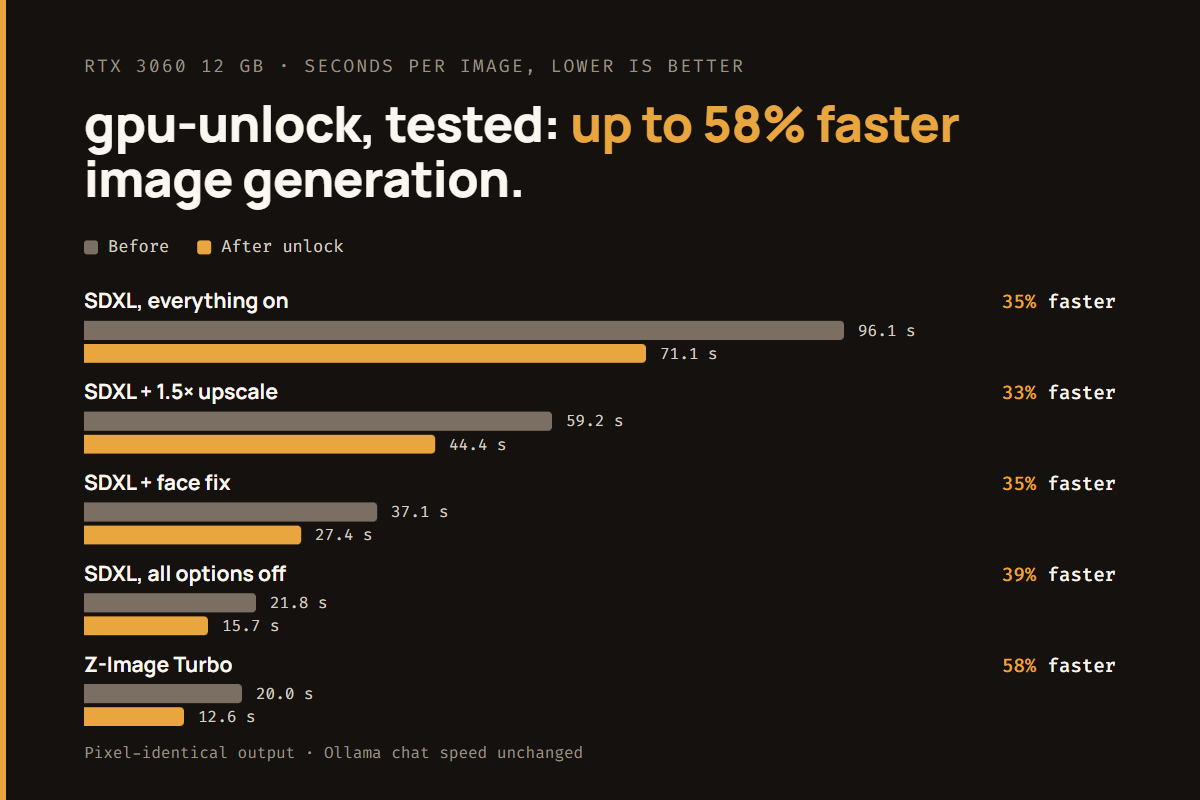
The result was a 33–58% speed-up in image generation, with pixel-identical output. The more useful result for me was seeing what happens when you check an AI-written guide against primary sources instead of following it.
What the unlock actually is
The project is gpu-unlock. On GeForce RTX 30-series cards, NVIDIA runs half-precision tensor math (FP16, BF16 and TF32) at a reduced rate compared with the professional cards built on the same chips. On "Lite Hash Rate" (LHR) cards like mine, all of those half-precision tensor paths are capped.
The module runs in the Linux kernel before the NVIDIA driver loads. It:
- runs a signed-firmware sequence on the GPU's security processor;
- writes two "speed selector" registers;
- resets the card, leaving the normal NVIDIA driver to load as usual.
The NVIDIA driver itself isn't modified.
Checking the AI's guide against the primary sources
The agent read the project's README, its source code and its issue tracker, and checked my actual VM and host configuration. Here's how Google's guide held up:
| Google's guide said | What we found |
|---|---|
Set the VM's CPU type to host so the module can see AVX2 | We'd already done this the day before, for an unrelated Ollama speed fix. The module doesn't need AVX2. |
| Disable Secure Boot in the VM | Doesn't apply. The VM boots with legacy BIOS (SeaBIOS), not UEFI. |
Run make, then sudo make install | make install builds Debian packages and installs them itself. |
| Install it inside the VM, not on the host | Correct. With passthrough the card belongs to the VM, and the module has to run where the NVIDIA driver runs. |
| Install the NVIDIA container toolkit and add GPU reservations in Docker | Already how my stack worked. Nothing to change. |
The guide wasn't wrong so much as generic. About half of it didn't apply to my system, and it left out the one detail most likely to break my system.
That detail was in issue #171. Someone running my exact Ubuntu 24.04 kernel found that the stock install failed on every boot. At startup, the system loaded the NVIDIA driver automatically. The driver took control of the card before the unlock module ran, so the module refused to touch it. The reporter's fix was a one-line early-boot script that loads the unlock module first.
The agent added that script before our first reboot. Our setup differed slightly from the reporter's, so we might not have hit the race at all. But the fix cost one line, and finding out the hard way would have cost an evening.
The agent's other checks, before recommending anything:
- Is our card supported? Yes. A merged pull request had validated my exact card, the RTX 3060 12 GB LHR (PCI ID
10de:2504), at about +85% on matrix math. Separate reports covered GPUs passed through to a Proxmox VM the same way as mine, and one used my exact NVIDIA driver version. - Can we trust the code? The repository was eight days old, with about 8,000 stars. The agent read the kernel module's source:
- It makes no network calls, writes no files and starts no user-space programs.
- The build downloads only NVIDIA's own open-source driver archive and one patch set, each checked against a pinned SHA-256 hash.
- What could go wrong?
- It runs reverse-engineered firmware on the card's security processor, and it marks the kernel as running out-of-tree code.
- One user, on a different card, reported a single hard lock in five boots that they couldn't reproduce.
- A future NVIDIA driver could refuse an unlocked card.
- Our setup had one untested difference from the published reports: a passthrough setting that hides the card's firmware ROM from the VM. The agent traced in the source how the module reads that firmware and judged the setting "probably fine." It was.
The recommendation was "worth a controlled test," not "free performance." It came with every one of those caveats, and it didn't present the project as better than the evidence supported. I approved the test.
AI checking AI
The guide I started with was AI-generated, and the engineer checking it was an AI. The difference wasn't the model. It was the method:
- The guide summarized what is usually true for setups like mine.
- The agent checked what was true for my setup. It read the source code, the issue tracker and the live configuration, and cited issue numbers and log lines for each claim.
If you use AI to research technical changes, require that second step. Ask for the evidence, not just the conclusion. A confident tone isn't evidence.
The test plan: a baseline first, then a control
Before touching anything, the agent wrote a benchmark script and ran it on the existing system. Nothing in this post would mean much without that baseline. The script measures:
- Raw matrix math (GEMM) at FP16, BF16 and TF32. This is the direct signal: if these don't move, nothing else will.
- FP32 matrix math as a control. The unlock shouldn't change it. If it moved, something other than the unlock had changed between runs, and the comparison wouldn't be valid.
- Every ComfyUI app configuration, run three times each with fixed seeds. The script records each run's time and a hash of the image's pixels, so "the images look the same" becomes a check, not an opinion.
- Ollama prompt-processing and generation speed on my default model.
- A GPU power and clock log for the whole run.
The backup plan, prepared before the change:
- A Proxmox snapshot of the VM, covering both disks.
- Copies of the bootloader configuration, on the VM and in my repository.
- A written rollback plan with four tiers:
- remove one kernel boot flag;
- uninstall the packages;
- hard-stop the VM from the hypervisor if it hangs;
- roll the whole VM back to the snapshot.
The results
On the first boot the kernel log ended with gpu_unlock: unlocked, and the NVIDIA driver loaded right after it with no errors.
| Test | Before | After | Change |
|---|---|---|---|
| FP16 matrix math | 27.1 TFLOPS | 46.7 TFLOPS | +73% |
| BF16 matrix math | 27.0 TFLOPS | 47.3 TFLOPS | +76% |
| TF32 matrix math | 13.3 TFLOPS | 23.2 TFLOPS | +75% |
| FP32 (control) | 9.2 TFLOPS | 9.3 TFLOPS | unchanged |
| SDXL image, all options off | 21.8 s | 15.7 s | 39% faster |
| SDXL + face fix | 37.1 s | 27.4 s | 35% faster |
| SDXL + 1.5× upscale | 59.2 s | 44.4 s | 33% faster |
| SDXL, everything on | 96.1 s | 71.1 s | 35% faster |
| SDXL image-to-image | 21.6 s | 16.0 s | 35% faster |
| Z-Image Turbo | 20.0 s | 12.6 s | 58% faster |
| Ollama prompt processing | 1,077 tok/s | 1,098 tok/s | unchanged |
| Ollama generation | 53.4 tok/s | 52.7 tok/s | unchanged |
All 18 test images were pixel-identical before and after. The unlock makes the card faster without changing its output.
Three things in that table are worth explaining.
Why image generation gained 35%, not 75%. The card's firmware caps it at 170 W. Before the unlock it was at that cap 55% of the time. Afterward, 87%. Twice the tensor math rate means reaching the power limit sooner. 170 W is the maximum the firmware allows, so software can't raise it.
Why Ollama didn't change. My chat models are 4-bit quantized. That work runs mostly on the card's INT8 path, which LHR cards never throttled. Text generation is also limited by memory bandwidth more than by math. The unlock helps PyTorch-based FP16/BF16 work (image generation, training, fine-tuning), not quantized LLM inference. Several reports on the project's tracker said the same before we started. We confirmed it with our own numbers.
Why the FP32 row matters. It's the most boring row in the table, and it's what makes the other rows believable.
Correcting our own rollback plan
We rebooted the VM twice more to confirm the unlock would come back: once normally, and once with a full stop and start from Proxmox.
Both times, the module logged an error: unlock failed (-114). Both times, the card still benchmarked at the unlocked speed.
The agent looked up the error code in the source. -114 means "already unlocked." The unlock had survived both VM restarts. The settings only reset when the card loses power.
That's good for stability. It also meant our rollback plan was wrong. Tiers 1 and 2 assumed that turning the module off and restarting the VM would put the card back to stock, since the hypervisor resets the card on every VM start. It doesn't. The only true rollback is powering off the whole server, which takes down every VM on it.
The agent reported this as plainly as the good results: "One correction to the restore plan. I said Proxmox's reset on VM start would undo the unlock. It doesn't." Then it rewrote the documentation before calling the job finished.
This is the habit I value most in an engineer, human or not: reporting your own mistakes with the same clarity as your successes. The same session included a benchmark script that crashed partway through (a parsing bug in the agent's own code) and a documentation edit that didn't apply because of a text-encoding problem. Each was reported, explained and fixed. None was buried.
The undervolt: a negative result
The card was now at its 170 W cap most of the time, so the obvious next step was undervolting: the same clocks at a lower voltage, so more work fits in the same power budget. On Linux with a current NVIDIA driver, you do this with a positive clock offset through NVIDIA's management library (NVML). Shifting the voltage-to-frequency curve up means each clock speed runs at a lower voltage.
The agent stepped the offset up and checked every step three ways: driver errors (NVIDIA "Xid" messages in the kernel log), image hashes against the unlocked reference, and timing.
| Offset | SDXL time | FP16 matrix math | Clock under load |
|---|---|---|---|
| None | 15.9 s | 46.8 TFLOPS | 1,700 MHz |
| Core +100 / +150 / +200 MHz | 16.0 / 15.5 / 15.9 s | 47.8 / 48.4 / 49.6 | 1,741 / 1,767 / 1,810 MHz |
| Core +250 MHz | crashed: Xid 13 + 43, CUDA "illegal instruction" | ||
| Memory +500 / +1000 / +1500 MHz | 15.9 / 16.2 / 15.8 s | 46.7 / 46.2 / 45.9 | 1,690 / 1,680 / 1,667 MHz |
- Core offset: clocks rose about 110 MHz, and raw math rose up to 6%. Image generation didn't get any faster, so clock speed was no longer the bottleneck.
- Memory offset: faster memory takes power from the core under the same cap, so it cancels itself out.
- +250 MHz crashed one test run. The GPU recovered once the image app was restarted.
We left the card at stock clocks, removed the tuning tools and wrote down the results. That entry will save me an evening the next time "undervolt your 3060" trends.
What I took from this
- Treat AI-written guides as leads, not instructions. Have someone check them against the source code, the issue tracker and your actual configuration. That someone can be an AI agent, as long as it shows its evidence.
- Run the baseline before you change anything, and include a control. "It feels faster" isn't a result.
- Test the rollback plan. Ours was wrong, and we only found out because we tested reboots before calling the work done.
- Report negative results and mistakes. The undervolt that didn't help and the rollback assumption that was wrong are as valuable as the 58%.
- Know what you're actually speeding up. The same unlock gave my image generation a large gain and my chat models nothing.
This is also the work I find most interesting about AI agents in operations. The useful skill isn't getting an agent to do something risky. It's setting up the work so the agent researches, tests and documents a risky change the way a careful senior engineer would, and stays honest about what it doesn't know. I do similar work as the Claude Champion for Marketing at BlueCat, and I've open-sourced some of the Claude Code skills that support it.
Related: The image apps benchmarked above are the ones I describe in ComfyUI for an Automatic1111 User, along with the "Free Ollama VRAM" button that lets chat and image generation share one 12 GB card.
More from my home AI lab: My Local AI Was Slow, and the GPU Wasn't the Problem · ComfyUI for an Automatic1111 User
Results are from my system: RTX 3060 12 GB LHR, NVIDIA driver 580, gpu-unlock 1.0.0. Your card, power limit and workload will produce different numbers. This is an unofficial modification; research it before you try it.

Leave a Reply